

Description
Yum – Figma Food Delivery Client & Admin Template
Yum – Figma Food Delivery Client & Admin Template is a modern, highly detailed, and professionally structured UI design system crafted for food delivery startups, restaurant apps, cloud kitchens, and online ordering platforms. Designed with precision and usability in mind, this Figma template includes both client-side and admin dashboard interfaces, making it a complete solution for designing a full-scale food delivery ecosystem.
Yum is built to simplify the design process while delivering a visually engaging and conversion-focused experience. Whether you are building a mobile food ordering app, a web-based delivery platform, or an internal management dashboard, this template provides everything required to design a seamless and efficient user journey from browsing menus to order tracking and backend management.
Overview
Yum is a comprehensive Figma UI template designed specifically for food delivery applications. It includes a wide range of pre-designed screens and components that cover both customer-facing interfaces and administrative dashboards.
The template focuses on creating a smooth and intuitive experience for users. From browsing food items and placing orders to managing deliveries and tracking performance, every aspect of the system is carefully designed for clarity and efficiency.
With its clean layout, organized components, and scalable design system, Yum enables designers and developers to create high-quality applications quickly and efficiently.
Benefits of Using Yum
-
Complete UI solution for both client and admin interfaces
-
Modern and visually appealing design for food delivery platforms
-
Fully customizable Figma components and layouts
-
Organized structure for faster workflow and easy navigation
-
Time-saving pre-built screens and elements
-
Consistent design system across all pages
-
High-quality, pixel-perfect UI elements
-
Easy collaboration with team members using Figma
-
Developer-friendly design for smooth handoff
-
Scalable system suitable for growing applications
Why Choose Yum
Yum stands out as a complete design system for food delivery platforms because it addresses both the customer experience and backend management needs.
One of the key reasons to choose this template is its dual-interface design. It includes both user-facing screens and admin dashboards, allowing you to design an entire platform within a single system.
Another advantage is efficiency. With ready-made screens and reusable components, you can significantly reduce design time and focus on enhancing user experience and functionality.
Additionally, Yum ensures consistency across all screens, which is essential for building a professional and user-friendly application.
Feature Highlights
-
Full set of food delivery app screens for clients
-
Admin dashboard UI for order and user management
-
Fully layered and organized Figma files
-
Reusable components and design elements
-
Modern and clean UI design
-
Consistent typography and color system
-
High-resolution layouts optimized for web and mobile
-
Easy customization and scalability
-
Developer-friendly structure for implementation
-
Regular updates and design improvements
Client-Side User Experience
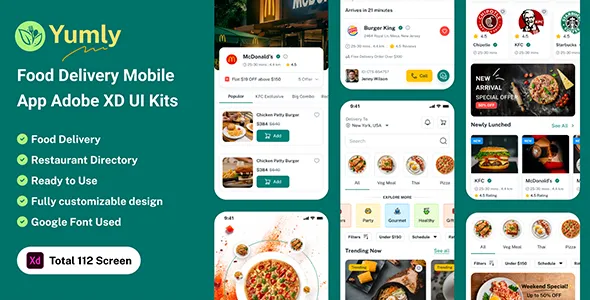
The client-side design in Yum focuses on delivering a seamless and enjoyable ordering experience. Users can easily browse menus, search for items, view detailed product pages, and place orders with minimal effort.
The layout is designed to guide users through the ordering process step by step, ensuring clarity and convenience. Features such as filters, categories, and quick actions enhance usability and improve engagement.
The design also includes order tracking and notifications, allowing users to stay informed about their orders in real time.
Admin Dashboard Functionality
Yum includes a powerful admin dashboard design that enables efficient management of the food delivery platform. The dashboard provides tools for managing orders, customers, restaurants, and analytics.
The interface is designed for clarity and efficiency, allowing administrators to monitor performance, track orders, and make data-driven decisions.
With its clean layout and structured components, the admin dashboard ensures smooth operations and improved productivity.
Design System and Consistency
Yum is built on a strong design system that ensures consistency across all screens. Typography, colors, spacing, and components are carefully defined to create a cohesive visual identity.
This consistency not only enhances the user experience but also simplifies the design process. Designers can easily reuse components and maintain uniformity throughout the project.
Figma Workflow and Collaboration
The template is fully optimized for Figma, enabling real-time collaboration and efficient design management. Teams can work together on the same file, share feedback, and make updates instantly.
Figma’s cloud-based platform ensures that your design files are accessible from anywhere, providing flexibility and convenience.
Version control features allow you to track changes and maintain consistency across your project.
Customization and Flexibility
Yum offers extensive customization options, allowing you to tailor the design to your specific requirements. You can easily modify colors, typography, and layouts to match your brand identity.
The modular structure of the template enables you to combine components in different ways, creating unique and personalized designs.
This flexibility makes Yum suitable for a wide range of food delivery applications.
Performance and Design Efficiency
Efficiency is a key advantage of Yum. The organized structure and reusable components reduce the time required to design and update screens.
This improves productivity and allows designers to focus on innovation and user experience.
The structured design also makes it easier for developers to implement the UI, resulting in faster development cycles.
Branding and Visual Identity
Yum provides the tools to create a strong brand identity. You can customize visual elements to reflect your brand’s personality and style.
From color schemes to typography and layout design, every aspect can be adjusted to create a unique and recognizable brand presence.
Use Cases and Applications
Yum is suitable for various applications, including:
-
Food delivery mobile apps
-
Restaurant ordering platforms
-
Cloud kitchen systems
-
Grocery delivery apps
-
Multi-vendor food marketplaces
-
On-demand delivery services
This versatility makes it a valuable asset for designers and businesses.
Content Structuring for Food Delivery Apps
The template provides a structured approach to content presentation, ensuring that users can easily navigate and interact with the app.
From menu listings and product details to checkout and order tracking, every element is designed to enhance usability.
The admin dashboard also follows a structured layout, making it easy to manage operations.
Who Should Use This Template
-
UI/UX designers working on food delivery apps
-
Startups building online ordering platforms
-
Developers creating full-stack delivery systems
-
Agencies designing apps for clients
-
Product managers focusing on user experience
Scalability and Growth
Yum is designed to support the growth of your application. Its scalable design system allows you to add new features and screens as your platform evolves.
This ensures that your design remains consistent and adaptable to future requirements.
Developer Handoff and Implementation
The structured layers and organized components make Yum highly developer-friendly. Developers can easily understand the design and convert it into functional code.
This reduces development time and ensures accuracy in implementation.
Engagement and User Retention
A well-designed interface plays a crucial role in user engagement. Yum helps create an interactive and visually appealing experience that keeps users coming back.
Features such as personalized recommendations, notifications, and easy navigation contribute to higher retention rates.
Reliability and Design Quality
Yum is built with attention to detail and high design standards. Every screen is crafted to ensure quality and consistency.
The template is regularly updated to stay aligned with modern design trends and user expectations.
Conclusion
Yum – Figma Food Delivery Client & Admin Template is a complete and powerful UI design solution for building modern food delivery platforms. With its comprehensive features, flexible customization, and user-focused design approach, it provides everything needed to create a successful application.
Whether you are designing a new app or improving an existing one, Yum offers the tools and efficiency required to bring your ideas to life.
Key Features
-
Complete client and admin UI design system
-
Fully customizable Figma components
-
Pixel-perfect and high-resolution layouts
-
Reusable and scalable design system
-
Organized layers for easy editing
-
Developer-friendly structure
-
Collaboration-ready design files
-
Time-saving pre-built screens
-
Consistent typography and color styles
-
Flexible and adaptable design framework
Yum is not just a UI template—it is a complete design ecosystem that empowers you to create engaging, efficient, and visually stunning food delivery applications with confidence and speed.