

Description
Travelin – Travel Tour Booking Figma UI Templates
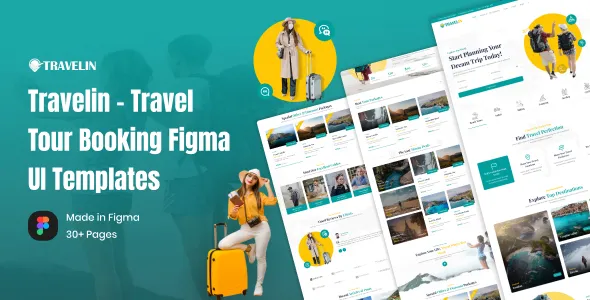
Travelin – Travel Tour Booking Figma UI Templates is a modern, visually engaging, and professionally structured UI design solution created for travel agencies, tour operators, booking platforms, destination services, travel startups, and tourism-focused digital products. Designed entirely in Figma, Travelin provides a complete and scalable interface system that supports travel discovery, tour listings, booking flows, and user engagement with clarity and elegance.
Travelin is built for experience-driven platforms where inspiration, trust, and ease of use are essential. Whether you are designing a travel booking website, a tour marketplace, or a mobile-first travel application, Travelin helps you present destinations, packages, and booking journeys in a way that feels intuitive, inspiring, and conversion-friendly.
Overview
Travelin is designed to meet the expectations of modern travelers who value smooth navigation, clear information, and visually rich experiences. The layouts focus on strong visual hierarchy, readable typography, and thoughtful spacing that guide users naturally from exploration to booking.
Built in Figma, Travelin allows full flexibility for customization and collaboration. Designers, product teams, and agencies can easily adapt screens, components, and styles to match brand identity and project requirements. The UI structure is suitable for both web and mobile travel platforms.
Designed for Travel and Tour Booking Platforms
Travel and tourism platforms require interfaces that balance inspiration with functionality. Travelin – Travel Tour Booking Figma UI Templates is structured to support real-world booking use cases and user behavior.
This UI kit is ideal for:
-
Travel agencies and tour operators
-
Tour booking and reservation platforms
-
Destination discovery websites
-
Travel startups and SaaS platforms
-
Vacation and holiday package services
-
Adventure and experience booking apps
-
Travel-focused mobile and web products
Each screen is designed to help users explore, compare, and book with confidence.
Benefits of Using Travelin
-
Creates a modern and engaging travel booking UI
-
Designed specifically for tourism and travel platforms
-
Fully editable and customizable in Figma
-
Clear user flows for browsing and booking
-
Visually rich layouts for destinations and tours
-
Consistent design system for scalable products
-
Easy collaboration and developer handoff
-
Suitable for web and mobile applications
Why Choose Travelin
Choosing Travelin – Travel Tour Booking Figma UI Templates means choosing a design system built around real travel booking journeys. Instead of generic layouts, Travelin focuses on how users search for destinations, evaluate tour options, and complete bookings.
The interface design guides users smoothly from inspiration to action, reducing friction and improving engagement. This makes Travelin ideal for products that aim to convert interest into confirmed bookings.
Visual Design and Travel-Focused Aesthetic
The visual identity of Travelin is clean, vibrant, and experience-driven. Typography is clear and modern, spacing is balanced, and color usage enhances imagery without overwhelming the interface.
The design allows destination photos, tour highlights, and travel experiences to take center stage. This aesthetic works well for luxury travel, adventure tours, cultural trips, and family vacations alike.
Screen and Layout Structure
Travelin includes thoughtfully designed UI screens that allow teams to build a complete travel booking experience.
You can design:
-
Travel homepage and destination discovery screens
-
Tour and package listing pages
-
Detailed tour and itinerary views
-
Booking and reservation flows
-
Search, filter, and category interfaces
-
User account and profile screens
-
Reviews, ratings, and testimonials sections
The modular layout system makes it easy to extend and adapt.
Figma-Based Workflow and Flexibility
Travelin is built entirely in Figma, enabling seamless collaboration between designers, product managers, and developers.
You can:
-
Customize components and styles easily
-
Create design variations quickly
-
Share prototypes with stakeholders
-
Prepare clean developer handoff files
The organized layer structure ensures efficiency and scalability.
User Experience and Booking Flow Optimization
Booking travel requires confidence and clarity. Travelin is designed to support intuitive user journeys that reduce confusion and drop-offs.
The UI supports:
-
Clear calls to action
-
Step-by-step booking processes
-
Easy comparison of tour options
-
Transparent pricing presentation
-
Reassuring confirmation and review screens
These elements help improve conversion rates.
Trust, Clarity, and Traveler Confidence
Trust is critical in travel platforms. Travelin reinforces credibility through clean layouts, readable information blocks, and structured content presentation.
You can highlight:
-
Tour details and inclusions
-
Policies and terms
-
Reviews and ratings
-
Host or operator information
-
Support and contact options
This transparency helps users feel confident before booking.
Customization and Brand Adaptability
Travelin allows full customization to match different travel brand identities. Colors, typography, spacing, and layout elements can be adapted easily within Figma.
It works well for:
-
Luxury travel brands
-
Budget and mass-market platforms
-
Adventure and experience-based tours
-
Corporate travel solutions
-
Local and global tourism services
Performance-Oriented Design Thinking
Although Travelin is a UI template, it follows design principles that translate well into fast and efficient development. Clean layouts and reusable components help developers implement interfaces efficiently.
This results in:
-
Faster development cycles
-
Consistent UI behavior
-
Easier maintenance
-
Scalable product design
Content Strategy and Travel Inspiration
Content plays a major role in travel platforms. Travelin supports sections for inspiration, storytelling, and destination highlights.
This content:
-
Encourages exploration
-
Builds emotional connection
-
Improves user engagement
-
Supports marketing campaigns
Scalability and Long-Term Product Growth
Travelin is designed for long-term scalability. As your travel platform grows, you can add new destinations, tour types, and features without redesigning the entire UI system.
The structured Figma design ensures consistency across future updates.
Who Should Use Travelin
-
Travel agencies and tour operators
-
Booking platform startups
-
Product designers and UI teams
-
SaaS companies in the travel industry
-
Agencies designing travel apps or websites
-
Entrepreneurs building tourism platforms
Business and Product Value
Travelin helps teams design professional travel booking platforms faster and more efficiently. It reduces design time, improves user experience quality, and supports stronger engagement and conversions.
By using a dedicated travel-focused UI system, you position your product as trustworthy, modern, and user-friendly.
Conclusion
Travelin – Travel Tour Booking Figma UI Templates is a modern, flexible, and experience-driven UI design solution for travel and tourism platforms. It enables teams to design intuitive booking journeys, showcase destinations beautifully, and create engaging travel experiences.
With its clean design, Figma-based flexibility, structured booking flows, and travel-focused aesthetic, Travelin is an excellent choice for anyone building a professional travel or tour booking product.
Key Features
-
Designed for travel and tour booking platforms
-
Fully editable Figma UI templates
-
Modern, experience-focused visual design
-
Structured booking and discovery flows
-
Easy customization and collaboration
-
Developer-friendly component system
-
Suitable for web and mobile products
-
Scalable for long-term platform growth
is a modern, visually engaging, and professionally structured UI design solution created for travel agencies, tour operators, booking platforms, destination services, travel startups, and tourism-focused digital products. Designed entirely in Figma, Travelin provides a complete and scalable interface system that supports travel discovery, tour listings, booking flows, and user engagement with clarity and elegance.
Travelin is built for experience-driven platforms where inspiration, trust, and ease of use are essential. Whether you are designing a travel booking website, a tour marketplace, or a mobile-first travel application, Travelin helps you present destinations, packages, and booking journeys in a way that feels intuitive, inspiring, and conversion-friendly.
Overview
Travelin is designed to meet the expectations of modern travelers who value smooth navigation, clear information, and visually rich experiences. The layouts focus on strong visual hierarchy, readable typography, and thoughtful spacing that guide users naturally from exploration to booking.
Built in Figma, Travelin allows full flexibility for customization and collaboration. Designers, product teams, and agencies can easily adapt screens, components, and styles to match brand identity and project requirements. The UI structure is suitable for both web and mobile travel platforms.
Designed for Travel and Tour Booking Platforms
Travel and tourism platforms require interfaces that balance inspiration with functionality. Travelin – Travel Tour Booking Figma UI Templates is structured to support real-world booking use cases and user behavior.
This UI kit is ideal for:
-
Travel agencies and tour operators
-
Tour booking and reservation platforms
-
Destination discovery websites
-
Travel startups and SaaS platforms
-
Vacation and holiday package services
-
Adventure and experience booking apps
-
Travel-focused mobile and web products
Each screen is designed to help users explore, compare, and book with confidence.
Benefits of Using Travelin
-
Creates a modern and engaging travel booking UI
-
Designed specifically for tourism and travel platforms
-
Fully editable and customizable in Figma
-
Clear user flows for browsing and booking
-
Visually rich layouts for destinations and tours
-
Consistent design system for scalable products
-
Easy collaboration and developer handoff
-
Suitable for web and mobile applications
Why Choose Travelin
Choosing Travelin – Travel Tour Booking Figma UI Templates means choosing a design system built around real travel booking journeys. Instead of generic layouts, Travelin focuses on how users search for destinations, evaluate tour options, and complete bookings.
The interface design guides users smoothly from inspiration to action, reducing friction and improving engagement. This makes Travelin ideal for products that aim to convert interest into confirmed bookings.
Visual Design and Travel-Focused Aesthetic
The visual identity of Travelin is clean, vibrant, and experience-driven. Typography is clear and modern, spacing is balanced, and color usage enhances imagery without overwhelming the interface.
The design allows destination photos, tour highlights, and travel experiences to take center stage. This aesthetic works well for luxury travel, adventure tours, cultural trips, and family vacations alike.
Screen and Layout Structure
Travelin includes thoughtfully designed UI screens that allow teams to build a complete travel booking experience.
You can design:
-
Travel homepage and destination discovery screens
-
Tour and package listing pages
-
Detailed tour and itinerary views
-
Booking and reservation flows
-
Search, filter, and category interfaces
-
User account and profile screens
-
Reviews, ratings, and testimonials sections
The modular layout system makes it easy to extend and adapt.
Figma-Based Workflow and Flexibility
Travelin is built entirely in Figma, enabling seamless collaboration between designers, product managers, and developers.
You can:
-
Customize components and styles easily
-
Create design variations quickly
-
Share prototypes with stakeholders
-
Prepare clean developer handoff files
The organized layer structure ensures efficiency and scalability.
User Experience and Booking Flow Optimization
Booking travel requires confidence and clarity. Travelin is designed to support intuitive user journeys that reduce confusion and drop-offs.
The UI supports:
-
Clear calls to action
-
Step-by-step booking processes
-
Easy comparison of tour options
-
Transparent pricing presentation
-
Reassuring confirmation and review screens
These elements help improve conversion rates.
Trust, Clarity, and Traveler Confidence
Trust is critical in travel platforms. Travelin reinforces credibility through clean layouts, readable information blocks, and structured content presentation.
You can highlight:
-
Tour details and inclusions
-
Policies and terms
-
Reviews and ratings
-
Host or operator information
-
Support and contact options
This transparency helps users feel confident before booking.
Customization and Brand Adaptability
Travelin allows full customization to match different travel brand identities. Colors, typography, spacing, and layout elements can be adapted easily within Figma.
It works well for:
-
Luxury travel brands
-
Budget and mass-market platforms
-
Adventure and experience-based tours
-
Corporate travel solutions
-
Local and global tourism services
Performance-Oriented Design Thinking
Although Travelin is a UI template, it follows design principles that translate well into fast and efficient development. Clean layouts and reusable components help developers implement interfaces efficiently.
This results in:
-
Faster development cycles
-
Consistent UI behavior
-
Easier maintenance
-
Scalable product design
Content Strategy and Travel Inspiration
Content plays a major role in travel platforms. Travelin supports sections for inspiration, storytelling, and destination highlights.
This content:
-
Encourages exploration
-
Builds emotional connection
-
Improves user engagement
-
Supports marketing campaigns
Scalability and Long-Term Product Growth
Travelin is designed for long-term scalability. As your travel platform grows, you can add new destinations, tour types, and features without redesigning the entire UI system.
The structured Figma design ensures consistency across future updates.
Who Should Use Travelin
-
Travel agencies and tour operators
-
Booking platform startups
-
Product designers and UI teams
-
SaaS companies in the travel industry
-
Agencies designing travel apps or websites
-
Entrepreneurs building tourism platforms
Business and Product Value
Travelin helps teams design professional travel booking platforms faster and more efficiently. It reduces design time, improves user experience quality, and supports stronger engagement and conversions.
By using a dedicated travel-focused UI system, you position your product as trustworthy, modern, and user-friendly.
Conclusion
Travelin – Travel Tour Booking Figma UI Templates is a modern, flexible, and experience-driven UI design solution for travel and tourism platforms. It enables teams to design intuitive booking journeys, showcase destinations beautifully, and create engaging travel experiences.
With its clean design, Figma-based flexibility, structured booking flows, and travel-focused aesthetic, Travelin is an excellent choice for anyone building a professional travel or tour booking product.
Key Features
-
Designed for travel and tour booking platforms
-
Fully editable Figma UI templates
-
Modern, experience-focused visual design
-
Structured booking and discovery flows
-
Easy customization and collaboration
-
Developer-friendly component system
-
Suitable for web and mobile products
-
Scalable for long-term platform growth