

Description
Taskpilot – Task Management Mobile App Figma UI Kit
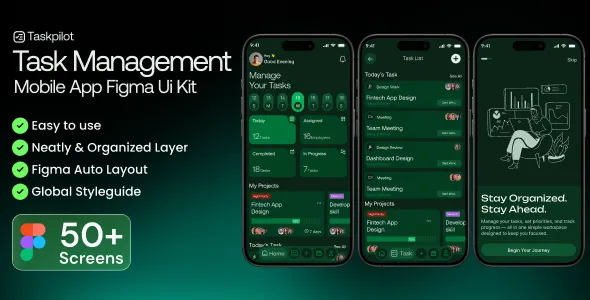
Taskpilot – Task Management Mobile App Figma UI Kit is a modern, clean, and highly functional mobile UI solution designed for creating powerful task management and productivity applications. Built in Figma, this UI kit provides a complete design system tailored for mobile apps that focus on organizing tasks, improving productivity, and enhancing user engagement.
Taskpilot is carefully crafted to deliver a seamless user experience with a strong emphasis on usability, clarity, and modern aesthetics. It is ideal for startups, designers, and developers who want to build task management apps, productivity tools, to-do list applications, or project tracking platforms without starting from scratch.
Overview
Taskpilot is a comprehensive Figma UI kit specifically created for mobile task management applications. It includes a wide variety of screens, components, and design elements that help streamline the app design process.
The UI kit follows modern design standards, ensuring consistency in typography, spacing, color schemes, and layout structure. Each screen is thoughtfully designed to guide users through task creation, scheduling, tracking, and completion.
With its organized structure and reusable components, Taskpilot enables designers to create scalable and visually consistent mobile applications efficiently.
Benefits of Using This UI Kit
- Clean and modern mobile app design
- Built entirely in Figma for easy editing
- Well-organized layers and components
- Time-saving design system
- Fully responsive mobile layouts
- Consistent UI/UX design language
- Easy collaboration between designers and developers
- High-quality icons and visual elements
- Flexible and scalable structure
- Suitable for multiple productivity app concepts
This UI kit helps accelerate the design process while maintaining professional quality.
Why Choose Taskpilot
Taskpilot stands out due to its focus on productivity-driven design. It is not just visually appealing but also functionally efficient, ensuring that users can manage tasks with minimal effort.
The UI kit is designed to simplify complex workflows. From task creation to progress tracking, every screen is optimized to reduce user friction and improve usability.
Another advantage is its adaptability. It can be customized for different types of applications, including personal task managers, team collaboration tools, and project management platforms.
Design and User Experience
The design approach is minimal, clean, and intuitive. It focuses on reducing clutter and highlighting essential elements, making it easier for users to interact with the app.
The layout ensures smooth navigation between screens, allowing users to quickly access their tasks, deadlines, and progress updates.
Typography is clear and readable, while color usage helps differentiate between task statuses, priorities, and categories. The overall experience is designed to keep users engaged and productive.
Customization and Flexibility
Taskpilot offers high customization flexibility. The Figma file is structured with clearly labeled layers, components, and styles, making it easy to modify.
Designers can quickly adjust colors, fonts, and layouts to match their brand identity. The use of reusable components ensures consistency across all screens while allowing easy updates.
This flexibility makes it suitable for both small projects and large-scale applications.
Feature Highlights
- Modern task management mobile UI design
- Fully editable Figma files
- Multiple app screens and layouts
- Organized layers and components
- High-quality icons and UI elements
- Consistent design system
- Easy customization
- Developer-friendly structure
- Scalable design architecture
- Ready for app development
Who Should Use This UI Kit
This UI kit is ideal for:
- Mobile app designers
- Startup founders building productivity apps
- Developers creating task management tools
- Agencies designing mobile applications
- Product teams working on SaaS or productivity platforms
It is suitable for both beginners and experienced professionals.
Use Cases
Taskpilot can be used for a variety of applications, including:
- Task management apps
- To-do list applications
- Project management tools
- Team collaboration platforms
- Productivity tracking apps
- Goal-setting applications
Its versatile design allows it to adapt to different app concepts.
UI Components and Screens
Taskpilot includes a wide range of mobile UI components:
- Onboarding screens
- Dashboard and overview screens
- Task creation and editing screens
- Calendar and scheduling views
- Notifications and reminders
- User profile screens
- Settings and preferences
- Progress tracking dashboards
- Lists and categories
- Navigation elements
These components help create a complete and functional mobile app design.
Workflow and Collaboration
Taskpilot is designed to improve collaboration between designers and developers. The structured Figma file ensures that all elements are easy to locate and understand.
Developers can quickly extract design specifications, assets, and styles, making the transition from design to development smooth and efficient.
This reduces development time and ensures consistency in the final product.
Branding and Visual Identity
The UI kit allows businesses to create a strong and recognizable brand identity. You can easily customize colors, typography, and visual elements to match your brand.
This helps in building a unique and consistent user experience across the application.
Conversion and User Engagement
The layout and design are optimized for user engagement. Clear navigation, intuitive interactions, and well-placed action buttons encourage users to stay active within the app.
This improves retention rates and overall user satisfaction.
Scalability
Taskpilot is designed to grow with your application. You can easily add new features, screens, and components without disrupting the existing design.
This makes it a long-term solution for evolving applications.
Development Readiness
The UI kit is developer-friendly, making it easy to convert designs into functional applications. It supports integration with modern development frameworks and tools.
This ensures a smooth development process from start to finish.
Conclusion
Taskpilot – Task Management Mobile App Figma UI Kit is a complete design solution for building modern and efficient productivity applications. Its clean design, flexibility, and user-focused approach make it a valuable resource for designers and developers.
It simplifies the app design process while ensuring a professional and engaging user experience, helping you create applications that stand out in the competitive productivity market.
Key Features
- Premium mobile app UI kit in Figma
- Designed for task and productivity apps
- Fully responsive mobile layouts
- Easy customization and editing
- Organized layers and components
- High-quality UI elements and icons
- Developer-friendly design structure
- Scalable and flexible architecture
- Consistent design system
- Suitable for various use cases
Taskpilot provides everything needed to design intuitive, efficient, and visually appealing mobile applications focused on productivity and task management.