

Description
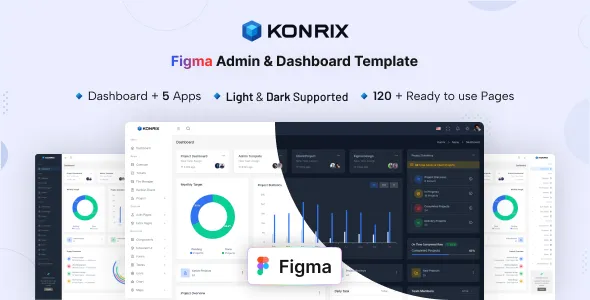
Konrix – Figma Admin & Dashboard Template
Konrix – Figma Admin & Dashboard Template is a modern, professional, and highly organized UI design template created specifically for SaaS platforms, web applications, CRM systems, ERP software, project management tools, analytics platforms, fintech solutions, business management software, admin panels, enterprise applications, startup products, and digital platforms that require intuitive dashboard interfaces. Designed entirely in Figma, Konrix provides a complete design system that helps designers, developers, startups, and product teams create visually appealing and user-friendly admin dashboards with maximum efficiency.
In today’s digital landscape, businesses rely heavily on web applications and software platforms to manage operations, analyze data, automate workflows, and improve productivity. The success of these platforms often depends on the quality of their user interface and user experience. Users expect clean layouts, intuitive navigation, responsive components, and data visualization that is easy to understand. Konrix is specifically designed to address these expectations by providing a comprehensive dashboard design solution that combines aesthetics, usability, and scalability.
Whether you are building a SaaS application, CRM platform, financial dashboard, HR management system, analytics tool, eCommerce backend, educational portal, healthcare management system, or enterprise software product, Konrix provides all the design assets needed to create a modern and professional user experience.
Modern Dashboard Design System
Konrix is built around a modern design philosophy that prioritizes usability, clarity, and visual consistency.
The template features a carefully structured design system that enables teams to maintain consistency across every screen and interface.
The design approach focuses on:
- Clean layouts
- Intuitive navigation
- Data visualization
- User accessibility
- Modern aesthetics
- Scalability
These principles help create interfaces that users can easily understand and navigate.
Designed Specifically for Admin Dashboards
Unlike generic UI kits, Konrix is created specifically for admin and dashboard applications.
Suitable projects include:
- SaaS platforms
- CRM systems
- ERP software
- HR management systems
- Accounting software
- Financial dashboards
- Analytics platforms
- Project management tools
- Inventory management systems
- Educational portals
- Healthcare applications
- Booking systems
- Customer support platforms
- Marketing automation tools
- Enterprise software
Its versatility makes it suitable for a wide variety of industries.
Comprehensive Dashboard Layouts
Dashboards serve as the control center of modern applications.
Konrix includes professionally designed dashboard layouts that provide clear access to important information and functionality.
Dashboard components may include:
- Analytics panels
- Performance metrics
- User activity tracking
- Financial summaries
- Revenue reports
- Project status widgets
- Notification centers
- Task management sections
These elements help users make informed decisions quickly.
Professional User Interface Design
User interface quality directly impacts user satisfaction and productivity.
Konrix focuses on delivering a premium user experience through:
- Balanced spacing
- Clear typography
- Consistent design patterns
- Structured content hierarchy
- Modern visual aesthetics
- User-centered interactions
These design principles improve usability and engagement.
Complete Figma Design System
A strong design system improves collaboration between designers and developers.
Konrix includes a comprehensive set of reusable components and design elements.
The design system may include:
- Buttons
- Forms
- Input fields
- Navigation menus
- Tables
- Cards
- Modals
- Alerts
These reusable components accelerate product development.
SaaS Application Dashboard Design
Software as a Service businesses require intuitive and scalable dashboard interfaces.
Konrix is ideal for SaaS products offering:
- Subscription management
- User analytics
- Customer engagement tracking
- Product performance monitoring
- Team collaboration tools
- Revenue reporting
These interfaces support efficient platform management.
CRM Dashboard Solutions
Customer Relationship Management platforms require specialized dashboard layouts.
Konrix supports CRM applications through dedicated interface components.
CRM features may include:
- Customer profiles
- Lead tracking
- Sales pipelines
- Contact management
- Task scheduling
- Communication history
These layouts help teams manage customer relationships effectively.
ERP System Interface Design
Enterprise Resource Planning systems require complex interfaces that remain user-friendly.
Konrix includes layouts suitable for:
- Inventory management
- Procurement systems
- Financial operations
- Human resources
- Manufacturing processes
- Business analytics
These interfaces simplify enterprise operations.
Project Management Dashboard Features
Project management software requires clear task organization and team collaboration tools.
Konrix supports:
- Project tracking
- Task management
- Team collaboration
- Progress monitoring
- Deadline management
- Resource allocation
These features help teams remain productive and organized.
Analytics and Data Visualization
Data is one of the most valuable assets for modern businesses.
Konrix includes dashboard layouts designed to present data effectively.
Analytics features may include:
- Charts
- Graphs
- Performance metrics
- Trend analysis
- Financial reports
- User behavior insights
These visualizations improve decision-making.
Financial Dashboard Templates
Financial platforms require interfaces that present complex information clearly.
Konrix supports financial applications such as:
- Accounting software
- Budget management tools
- Investment platforms
- Banking applications
- Expense tracking systems
- Financial analytics platforms
These interfaces enhance data clarity and accessibility.
Human Resource Management Interfaces
HR software requires user-friendly interfaces for managing workforce operations.
Konrix includes layouts suitable for:
- Employee management
- Recruitment systems
- Attendance tracking
- Payroll processing
- Performance evaluations
- Training management
These features support efficient workforce administration.
eCommerce Admin Dashboard Design
Online businesses require powerful backend systems.
Konrix supports eCommerce platforms through layouts for:
- Product management
- Order processing
- Customer management
- Inventory tracking
- Sales reporting
- Marketing analytics
These tools help businesses manage operations effectively.
Educational Platform Dashboard Support
Educational technology platforms require specialized dashboard interfaces.
Konrix is suitable for:
- Learning management systems
- Student portals
- Instructor dashboards
- Online course platforms
- Educational analytics
- Certification systems
These interfaces improve educational administration.
Healthcare Management Dashboard Design
Healthcare applications require organized and accessible interfaces.
Konrix supports healthcare solutions such as:
- Patient management systems
- Hospital administration software
- Medical scheduling tools
- Health analytics platforms
- Clinical management systems
These layouts support healthcare efficiency.
Startup and Product Development Support
Startups often require flexible design systems that can scale with business growth.
Konrix helps product teams:
- Build MVPs
- Design prototypes
- Accelerate product launches
- Maintain design consistency
- Improve collaboration
- Support future expansion
These benefits make it ideal for startups.
Responsive Design Framework
Modern applications must function across multiple devices.
Konrix includes responsive layouts designed for:
- Desktop interfaces
- Tablets
- Mobile devices
- Large displays
Responsive designs ensure consistent user experiences.
User Experience Focused Components
Excellent user experience improves engagement and retention.
Konrix incorporates UX best practices such as:
- Intuitive navigation
- Clear workflows
- Accessible design
- Consistent interactions
- Visual hierarchy
- Efficient information architecture
These principles improve usability.
Design Consistency Across Applications
Maintaining consistency is essential for large digital products.
Konrix helps teams achieve consistency through:
- Shared components
- Reusable design patterns
- Unified typography
- Consistent spacing
- Standardized color systems
These elements simplify design management.
Team Collaboration Benefits
Figma has become a preferred platform for collaborative design workflows.
Konrix supports team collaboration by providing:
- Organized file structures
- Shared design assets
- Reusable components
- Collaborative workflows
- Efficient handoff processes
These features improve productivity.
Rapid Prototyping Capabilities
Prototyping is essential during product development.
Konrix enables teams to:
- Build wireframes quickly
- Create interactive prototypes
- Validate ideas
- Conduct usability testing
- Improve stakeholder communication
These benefits accelerate development cycles.
Professional Branding Opportunities
Digital products require strong and consistent branding.
Konrix supports customization through:
- Color systems
- Typography controls
- Icon libraries
- Layout flexibility
- Component customization
These tools help businesses create unique identities.
Organized Design Structure
Large projects require well-structured design files.
Konrix offers:
- Layer organization
- Component grouping
- Design documentation
- Clear naming conventions
- Structured workflows
These practices improve project management.
Why Choose Konrix – Figma Admin & Dashboard Template
Konrix combines modern UI design principles with powerful dashboard functionality.
Key advantages include:
- Professional dashboard layouts
- Comprehensive design system
- Responsive design support
- Data visualization components
- SaaS platform compatibility
- CRM dashboard solutions
- ERP interface support
- Figma-based workflow
- Team collaboration tools
- Extensive customization options
These features help teams build exceptional digital products.
Perfect for Multiple Industries
Konrix is suitable for:
- SaaS companies
- Startups
- Financial institutions
- Healthcare providers
- Educational platforms
- eCommerce businesses
- HR software providers
- Enterprise organizations
- Marketing agencies
- Technology companies
Its flexibility supports a wide range of applications.
Supporting Product Growth and Scalability
As digital products evolve, design systems must remain scalable.
Konrix helps businesses:
- Maintain consistency
- Improve user experiences
- Accelerate development
- Reduce design complexity
- Support product expansion
- Strengthen branding
These benefits contribute to long-term product success.
Conclusion
Konrix – Figma Admin & Dashboard Template is a comprehensive UI design solution created for SaaS platforms, CRM systems, ERP software, analytics tools, enterprise applications, startups, and modern digital products seeking a professional and scalable dashboard interface. With its modern design system, responsive layouts, reusable components, data visualization capabilities, collaboration-focused workflow, and extensive customization options, Konrix provides everything needed to design exceptional admin dashboards and web applications.