

Description
Foodee – Food Delivery App UI Kit
Foodee – Food Delivery App UI Kit is a complete, production-ready interface system designed for modern food delivery applications that prioritize speed, clarity, and customer satisfaction. Built for startups, restaurants, cloud kitchens, and delivery platforms, Foodee helps teams design seamless ordering experiences that feel intuitive, reliable, and enjoyable from first tap to final delivery.
Food delivery is a habit-driven product category. Users expect fast discovery, clear menus, smooth checkout, and real-time updates—without friction. Foodee is crafted around these expectations, offering a thoughtfully structured UI kit that supports real user behavior, high-frequency usage, and scalable product growth.
Foodee is not a visual concept or showcase. It is a practical mobile UI foundation built for real food delivery apps operating in competitive markets.
Overview
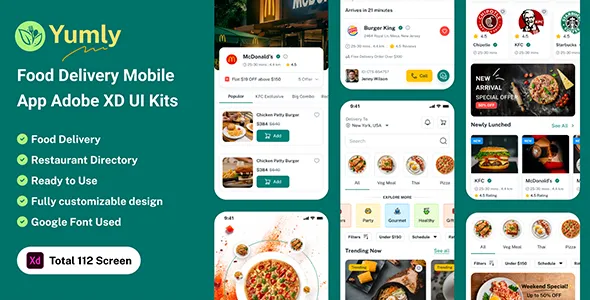
Foodee is a comprehensive mobile UI kit tailored specifically for food ordering and delivery experiences. It includes a wide range of screens covering onboarding, location selection, restaurant discovery, menus, cart management, checkout, order tracking, payments, profiles, and support flows.
The design language is clean, modern, and appetite-driven. Visual hierarchy is carefully balanced to keep food imagery prominent while ensuring prices, actions, and navigation remain clear. Typography is readable, spacing is optimized for mobile interaction, and color usage supports appetite appeal without overwhelming users.
The UI kit is suitable for both iOS and Android design workflows and adapts smoothly across different screen sizes.
Designed for Real Food Delivery Workflows
Foodee is built around how people actually order food. From quick lunch orders to family dinners, the interface supports fast decisions, repeat orders, and discovery-driven browsing.
User flows are optimized for minimal taps. Restaurants, menus, and actions are always easy to find. The design supports both first-time users and returning customers who want speed and familiarity.
This makes Foodee suitable for consumer-facing food apps as well as restaurant-owned delivery platforms.
Onboarding and Location-Based Experience
Foodee includes onboarding screens designed to introduce the app quickly without friction. These screens focus on value—fast delivery, wide choices, and convenience—rather than lengthy explanations.
Location selection and address management screens are designed to be clear and fast, supporting accurate delivery from the beginning. This reduces errors and improves user trust early in the journey.
A smooth start sets the tone for the entire app experience.
Restaurant Discovery and Browsing
Restaurant discovery is a critical part of food delivery UX. Foodee provides clean, visually engaging layouts for listing restaurants by category, popularity, rating, or distance.
Cards are designed to highlight essential information such as cuisine type, delivery time, ratings, and offers without clutter. Filters and sorting options are intuitive, helping users narrow choices quickly.
The browsing experience feels effortless and engaging.
Menu and Food Item Presentation
Menus in Foodee are designed for clarity and appetite appeal. Food items are presented with strong visuals, clear names, descriptions, and pricing.
Add-ons, customizations, and variations are easy to understand and select. The interface supports both simple menus and complex restaurant offerings without confusion.
This clarity reduces ordering errors and improves satisfaction.
Cart and Order Review Experience
Foodee includes structured cart screens that allow users to review items, adjust quantities, apply offers, and see pricing breakdowns clearly.
The cart experience is calm and transparent, helping users feel confident before checkout. Important details such as delivery fees, taxes, and discounts are displayed clearly.
This reduces abandonment and builds trust.
Checkout and Payment Flow
Checkout screens in Foodee are designed to be fast, secure, and predictable. Address confirmation, payment selection, and order placement are presented in a logical flow.
The UI supports multiple payment options and clear confirmation states. Users always know what step they are on and what comes next.
A smooth checkout experience is essential for conversion, and Foodee prioritizes it.
Order Tracking and Delivery Status
Order tracking screens are a core part of the food delivery experience. Foodee includes layouts for real-time order status, preparation updates, delivery progress, and estimated arrival times.
Visual cues and status indicators keep users informed without anxiety. This transparency improves trust and reduces support requests.
Tracking screens are designed to be glance-friendly and reassuring.
User Profiles and Order History
Foodee provides clean layouts for user profiles, saved addresses, payment methods, and order history.
Repeat ordering is made easy through clear history views and re-order actions. This supports habit formation and long-term user retention.
Account management screens remain simple and approachable.
Offers, Promotions, and Engagement
Foodee includes UI patterns for promotions, discounts, and special offers. These elements are designed to attract attention without disrupting the core ordering flow.
Promotional banners and deal sections are visually distinct but not intrusive, supporting both engagement and conversion.
This balance is critical in competitive food delivery markets.
Support and Help Interfaces
Customer support screens are included to help users resolve issues quickly. Order help, FAQs, and contact options are structured clearly.
Reducing friction during problem moments improves overall app trust and satisfaction.
Support interfaces are calm, clear, and action-oriented.
Visual System and Food-Centric Design
Foodee uses a friendly, food-centric visual system. Colors are warm and inviting, typography is legible, and spacing supports touch interaction.
The design avoids unnecessary decoration, focusing instead on usability and appetite appeal.
This creates an experience that feels both modern and comfortable.
Accessibility and Usability Focus
Foodee emphasizes accessibility through readable text sizes, strong contrast, and touch-friendly controls.
Clear labeling and predictable navigation help users of all ages and experience levels order confidently.
These usability principles support inclusive design and broader adoption.
Developer-Ready and Scalable Structure
Foodee is designed with scalability in mind. UI components follow consistent patterns that developers can easily implement and extend.
The structure supports feature expansion such as subscriptions, loyalty programs, or multi-vendor systems without redesign.
This makes Foodee suitable for MVPs as well as large-scale platforms.
Customization and Branding Flexibility
Foodee can be adapted easily to different brand identities. Colors, icons, typography, and imagery can be customized while maintaining usability.
This allows startups, restaurants, and aggregators to create distinct food delivery apps using the same strong UI foundation.
Brand flexibility increases long-term value.
Use Cases and Applications
Foodee is suitable for food delivery apps, restaurant ordering systems, cloud kitchen platforms, grocery and meal delivery services, and local delivery startups.
It works for both single-restaurant apps and multi-vendor marketplaces.
This versatility makes it a strong foundation for multiple product ideas.
Rapid Product Design and Launch
Foodee significantly reduces design time by providing ready-made, well-structured mobile screens.
Teams can focus on backend logic, partnerships, and operations instead of rebuilding standard UI patterns.
This speed advantage is crucial in competitive delivery markets.
Ideal Users
Foodee is ideal for mobile app developers, startups, food delivery platforms, restaurants, UI/UX designers, and agencies building ordering and delivery apps.
It is especially suited for teams that value usability, speed, and real-world performance.
Long-Term Value
Foodee is designed for longevity. Its clean, food-focused design avoids short-lived trends, ensuring relevance as delivery habits and technologies evolve.
The scalable UI system supports growth, feature expansion, and rebranding without major redesign.
Conclusion
Foodee – Food Delivery App UI Kit delivers a fast, intuitive, and production-ready interface foundation for modern food delivery applications. By focusing on real ordering behavior, clear navigation, and smooth checkout flows, Foodee helps transform food ordering into a seamless, satisfying mobile experience.
Whether launching a local delivery app or scaling a multi-vendor food platform, Foodee provides the structure, usability, and flexibility needed to build products users return to again and again.
Key Features
-
Mobile UI kit designed for food delivery apps
-
Restaurant discovery, menu, cart, and checkout screens
-
Real-time order tracking and delivery status layouts
-
Clean, food-centric visual system
-
User profiles, order history, and support interfaces
-
Fully mobile-friendly and scalable structure
-
Easy customization for different food brands
-
Suitable for MVPs and production-ready platforms