

Description
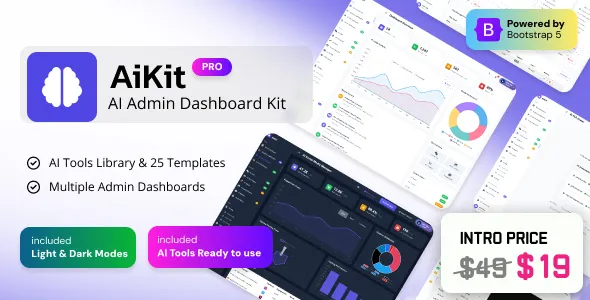
AIKIT Pro – Bootstrap 5 Artificial Intelligence Admin Dashboard emerges as the ultimate all-in-one control panel for managing, visualizing, and interpreting complex AI systems, datasets, and business insights. Built using Bootstrap 5, HTML5, CSS3, JavaScript (ES6), and optimized for cutting-edge AI integration, AIKIT Pro is not just an admin dashboard — it’s an intelligent ecosystem crafted to empower developers, AI researchers, and enterprises in visualizing performance metrics, managing models, tracking data pipelines, and overseeing analytics workflows with precision and elegance. Every inch of this template has been engineered to handle data-intensive operations while maintaining simplicity, responsiveness, and adaptability across devices.
AIKIT Pro brings to life a harmonious balance between performance and design. Its architecture combines modular UI components, reusable code structure, and advanced data-driven visualizations. It serves as a powerful foundation for AI platforms, ML workflow management systems, analytics dashboards, neural network performance tracking interfaces, or any smart solution that demands clarity, scalability, and intuitive design. Whether you are building an AI-powered SaaS application, an internal data science control panel, or a machine-learning monitoring tool, AIKIT Pro stands ready to elevate your project with state-of-the-art design patterns and unmatched functionality.
Overview
AIKIT Pro is purpose-built for modern AI-driven applications that require an administrative dashboard capable of handling large datasets, tracking neural network outputs, and visualizing real-time data flow. It’s designed with the future in mind—fully responsive, mobile-first, and highly customizable. The dashboard layout is clean and minimal, making data interaction effortless and accessible even for users managing multiple projects simultaneously.
At its core, AIKIT Pro leverages Bootstrap 5’s grid system and utility-first architecture, allowing developers to easily create adaptive and flexible layouts. The design system seamlessly integrates components like charts, tables, widgets, and cards to represent data dynamically. The use of SCSS variables and modular components allows full customization—developers can tweak colors, typography, or layout structures without breaking consistency across pages.
AIKIT Pro’s dashboard isn’t limited to generic admin features—it includes AI-specific visual components such as model performance graphs, data-pipeline overviews, accuracy heatmaps, loss function trend charts, and training-progress trackers. These tools allow developers, analysts, and decision-makers to visualize how models evolve over time, monitor inference accuracy, and make data-driven improvements in real-time.
Built with scalability in mind, AIKIT Pro easily integrates with REST APIs, GraphQL, or backend systems like Django, Flask, Laravel, or Node.js. The template’s front-end code is cleanly structured and well-commented, ensuring it’s simple for any developer to implement back-end logic, real-time APIs, or cloud integrations for analytics and automation.
Features
1. Fully Responsive Bootstrap 5 Framework
AIKIT Pro is developed using the robust and flexible Bootstrap 5 framework. Every grid, form, and layout automatically adapts to any screen size. Whether it’s desktop monitors, tablets, or mobile devices, the UI maintains perfect alignment and spacing. The Bootstrap base makes it easy to extend or customize UI patterns without sacrificing responsiveness or consistency.
2. Data-Driven Visualization Modules
AIKIT Pro includes a variety of visualization components like ApexCharts, Chart.js, ECharts, and D3.js integrations. From line graphs that track training loss and accuracy metrics to pie charts for data-set distribution and heatmaps for inference comparison, the visualization layer is fine-tuned for AI use cases.
3. Advanced Dashboard Layouts
Multiple dashboard variations are provided—Analytics Dashboard, Model Tracking Dashboard, and System Overview Dashboard. Each one is uniquely designed to display data relevant to different aspects of AI operations. Developers can choose one or merge multiple dashboards into a custom workspace.
4. Model Performance Tracking
A key highlight of AIKIT Pro is its model monitoring system. It provides built-in UI patterns for tracking accuracy, F1 score, precision, recall, loss rates, and confusion matrices. These can be fed directly through APIs from AI model servers or data logs.
5. Dataset Management Interface
AIKIT Pro offers a dataset management UI with upload and preview capabilities. Users can manage different dataset versions, view metadata summaries, and monitor preprocessing results—all within intuitive data tables.
6. Real-Time Data Monitoring
Through WebSocket or API integrations, AIKIT Pro supports real-time chart updates for streaming data pipelines, enabling instant visualization of model predictions or live metrics from production systems.
7. Role-Based Access Control
User management modules allow administrators to assign roles like Data Scientist, Engineer, or Analyst, each with custom permissions for specific dashboard modules.
8. Interactive Tables
Tables with sorting, filtering, pagination, and inline editing make managing large datasets and user logs easier.
9. Modular Widgets
Includes 100+ pre-built widgets for AI monitoring: accuracy counters, performance summaries, training iteration displays, GPU usage meters, CPU load stats, and memory utilization cards.
10. Authentication Pages
AIKIT Pro includes modern and secure Login, Register, Forgot Password, and Two-Factor Authentication pages styled with Bootstrap 5 components and custom validation UI.
11. Error & Maintenance Screens
Ready-made 404, 500, and Maintenance pages with clean illustrations and smooth animation effects.
12. Advanced Chart Integrations
AIKIT Pro integrates multiple chart libraries. Each widget is customizable, allowing developers to change chart types, color schemes, and data sources instantly.
13. Forms and Wizards
Includes a collection of advanced form templates: multi-step wizards, input validations, checklists, and upload forms. Useful for building AI training configuration panels or dataset upload workflows.
14. Notifications & Alerts
A central notification system built with Bootstrap Toast and custom JS modules for announcements, alerts, or updates from backend APIs.
15. File Management System
Supports file upload and management UIs with progress tracking, folder structures, and metadata previews—perfect for handling AI model weights, datasets, or documentation files.
16. Multi-Language Support
Internationalization support makes it easy to translate dashboard content using i18next or similar libraries.
17. Dark & Light Mode
Dual theme system implemented with CSS variables. The dark mode is optimized for low-light environments used by data engineers or researchers working long hours.
18. Calendar & Scheduling System
Integrated calendar UI for scheduling model runs, experiments, or team meetings.
19. Inbox & Chat UI
AIKIT Pro provides a UI for internal communication with team members—chat interfaces, email templates, and messaging systems for project discussions.
20. Documentation & Developer Guide
AIKIT Pro includes detailed documentation explaining setup steps, customization options, and integration guides for APIs and backend frameworks.
Design
AIKIT Pro’s design philosophy revolves around clarity, precision, and efficiency—values that align perfectly with the world of artificial intelligence. Its color palette draws inspiration from modern tech aesthetics: deep blues, gradient purples, and sleek grays symbolizing intelligence and innovation. Typography choices like Inter and Roboto ensure readability across devices and long work sessions.
Each UI element has been refined to minimize cognitive load while maximizing visibility. Charts are color-coded by data significance, forms are neatly aligned, and dashboard panels are spaced proportionally for quick scanning. Animations are subtle and used sparingly to enhance interactivity without causing distraction.
From a UX perspective, AIKIT Pro focuses on accessibility and usability. Buttons, tooltips, and input fields maintain optimal size and contrast ratios. All components adhere to WCAG 2.1 standards, ensuring the dashboard is usable by all audiences.
Layouts are modular and flexible—users can switch from horizontal to vertical navigation, expand/collapse sidebars, and rearrange panels through drag-and-drop interactions. The entire dashboard is optimized for speed and minimalism—no unnecessary code, only functional elegance.
Every chart, card, and widget is designed to visually represent complex data in a digestible manner. For example, neural network training progression graphs show color transitions that help distinguish between epochs, while model comparison widgets highlight best-performing models with dynamic badges. The dashboard adapts to the cognitive workflows of AI professionals, making it not just a design template but a true digital workspace.
Use Cases
-
AI Research Dashboards – Perfect for machine-learning labs and research teams tracking experiments, visualizing loss curves, and managing datasets.
-
Data Science Platforms – Use it as a frontend for JupyterHub or cloud-based analytics portals to visualize model performance.
-
SaaS AI Tools – Build an intelligent admin panel for your AI product or analytics SaaS with ready-to-integrate modules.
-
Enterprise Analytics Systems – Manage large-scale data flows and system metrics for AI-powered businesses.
-
IoT and Automation Platforms – Visualize device data, AI predictions, and automation logs using AIKIT’s data widgets.
-
Healthcare AI Applications – Track medical AI model accuracy, predictions, and real-time hospital metrics in secure dashboards.
-
Financial Forecasting Tools – Monitor models predicting stock trends or credit risk using interactive graphs.
-
E-Commerce AI Solutions – Analyze user behavior, recommendation system efficiency, and conversion data.
-
Education & Training Dashboards – Create AI course portals that track learning models, performance analytics, and exam data.
-
Startup AI Systems – Ideal for startups building AI-driven applications needing fast, flexible, and visually refined dashboards.
Conclusion
AIKIT Pro – Bootstrap 5 Artificial Intelligence Admin Dashboard represents the next evolution of intelligent web dashboards—where data meets design, and performance meets usability. It encapsulates everything modern developers, AI engineers, and businesses need to build dynamic, scalable, and visually stunning AI management interfaces.
Its foundation on Bootstrap 5 ensures adaptability and rapid customization; its design system ensures clarity and modernity; and its integration-ready structure ensures real-world practicality. AIKIT Pro doesn’t just present data—it transforms raw information into understandable, actionable, and aesthetically pleasing insights.
If you’re building an AI-powered SaaS platform, a deep-learning monitoring suite, or an enterprise analytics dashboard, AIKIT Pro is your ultimate toolkit. It’s lightweight, modular, future-ready, and meticulously crafted for high-performance environments. With AIKIT Pro, you can focus on innovation while the dashboard handles the presentation. It’s not just a template—it’s the intelligent core of your next great project.